


Hey :)
Thank you for the support and the love you have given this newsletter. It means more than you know.
Hermes is a free, open-source AI assistant from Nous Research that remembers you, runs scheduled jobs and answers messages from your phone. An experimental plugin lets it run on a Claude Pro or Max plan through Claude Code, with no API key. Anthropic’s terms restrict third-party use of plan logins, so read them first.
The first setup guide I wrote for Hermes had eleven steps, a troubleshooting section and a billing warning. Why you would want Hermes at all got one line.
The question arrived the next morning, from someone who had just installed it, and it was the right one: if I have Hermes now, do I still need Claude?
Yes. Claude is the brain. Hermes is a personal assistant that uses the brain. Hermes is an AI agent, which means it does more than answer: it takes actions, keeps notes about you between conversations, and runs jobs on a schedule. Mine sends me a briefing every morning at 10 with calendar clashes, urgent email and follow-ups.
Every assistant needs a brain, and brains cost money. The usual way to give Hermes a Claude brain is an API key: a separate account with Anthropic, billed per request, on top of the plan you already pay for. On 20th September 2026, Nous Research added a plugin that lets Hermes use your Claude Pro or Max plan instead. I run it on my own plan every day, and I have walked others through the setup. It also sits in a grey area of Anthropic’s terms, and what is at stake is your Claude account, so that comes first.
If you have not installed Claude Code yet, start with the install guide and come back.
Is running Hermes on a Claude plan allowed?
You sign in through Claude Code’s own login, not through Hermes, and Nous Research's plugin page says it drives “the unmodified official Claude Code executable”. But Hermes is still another company’s app, and Anthropic’s page on the Agent SDK, its toolkit for building agents, says it does not allow third parties to offer “claude.ai login or rate limits for their products” unless previously approved. I have not seen an approval announced.
The same terms page says Anthropic “reserves the right to take measures to enforce these restrictions and may do so without prior notice.” It does not say what those measures are. So the worst case is that Anthropic acts on the Claude account you signed in with, without warning, and the page does not say whether that means limiting it or something stronger. If that account is the one your work depends on, weigh that before step 5.
Nous Research labels the plugin experimental. Read the two pages yourself before deciding: the Claude Code terms and the Agent SDK overview.
If you want no question at all, Hermes also runs on an Anthropic API key, billed per use. The install is the same, except you skip steps 5 to 7 below, and in step 8 you choose Anthropic and paste your key. That route does not need Claude Code at all.
When do you use Hermes instead of Claude Code?
Claude Code is still where I do most of my work. I sit at my desk, open the project, and steer it step by step: documents, prototypes, skills, anything with files in a folder. It has its own memory files, scheduled routines and a way to reach it from the Claude apps, so this is not about what it cannot do.
Hermes is for the part of my day that happens away from the desk. The split in my head is simple: Claude Code is where I sit down and drive. Hermes is what I message when I am not sitting down.
From my phone, not my laptop. Hermes lives in Telegram, WhatsApp, Slack, Discord and more. I send it a message on a walk and it replies, the way a person would.
Schedules in one sentence. I type “every morning at 9, send me my calendar and anything urgent” into that chat, and Hermes sets up the job itself. When the time comes, it runs in a fresh session and sends the result back to the same chat.
One memory about me, across everything. Hermes keeps two short notes, one about me and one of its own working notes, and reads them at the start of every conversation. Every past conversation sits in a searchable history on my machine, so “what did we decide on Tuesday?” has an answer.
Any brain. Your Claude plan, an API key from Anthropic or OpenAI, OpenRouter, and others. Claude Code runs on Claude.
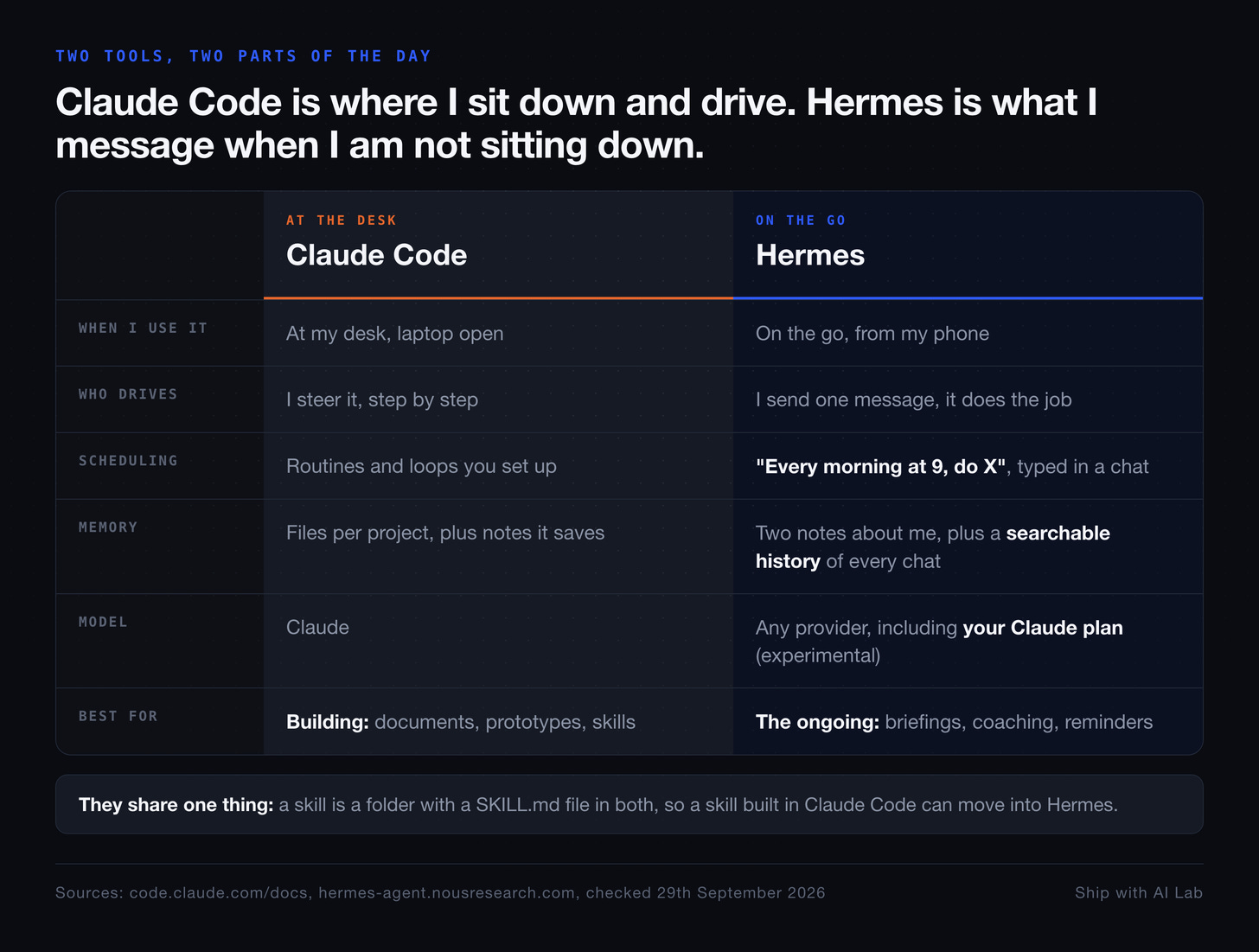
The two also work together. A Hermes skill is the same shape as a Claude skill, a folder with a SKILL.md file inside, so a skill I built in Claude Code can move into Hermes. I moved my own learning skill across by pasting it in, and Hermes ran it.
Two limits to know. Messages and scheduled jobs run through a background process on the machine where Hermes is installed, so if that is your laptop and it is asleep, the morning job does not run. Nous Research’s own suggestion for always-on is a small rented computer in the cloud: “Run it on a $5 VPS”. And Nous says Hermes “creates skills from experience, improves them during use”. On my machine several skills are tagged as learned, and I did not write them. Read what it saves, the way you would read a new assistant’s notes.
What does it cost to run Hermes on your Claude plan?
Hermes is free. You pay for the brain.
On the plugin route, four things decide what that costs:
Every run counts against your plan’s usage limits. Anthropic’s help page is direct: third-party app usage “still draw[s] from your subscription’s usage limits.”
Hermes and Claude Code share those limits. A busy scheduled job can use up the allowance you needed for Claude Code that afternoon.
An agent can use the allowance faster than you do. A scheduled job works through its steps without waiting for you, so a single job can make many requests before you look at it.
Extra usage costs extra. If usage credits are switched on, going past your plan’s limit is billed “as additional charges on your bill.” Open Settings, then Usage, in your Claude account and either leave usage credits off or click “Adjust limit” to set a monthly cap. The cap stops surprise charges. It does not raise your plan’s limits.
One trap worth checking. If your computer has an Anthropic API key saved as a setting called ANTHROPIC_API_KEY, Claude Code uses the key instead of your plan, “resulting in API usage charges”. If you have ever set up an API key, ask Claude Code: “is ANTHROPIC_API_KEY set on this machine?”
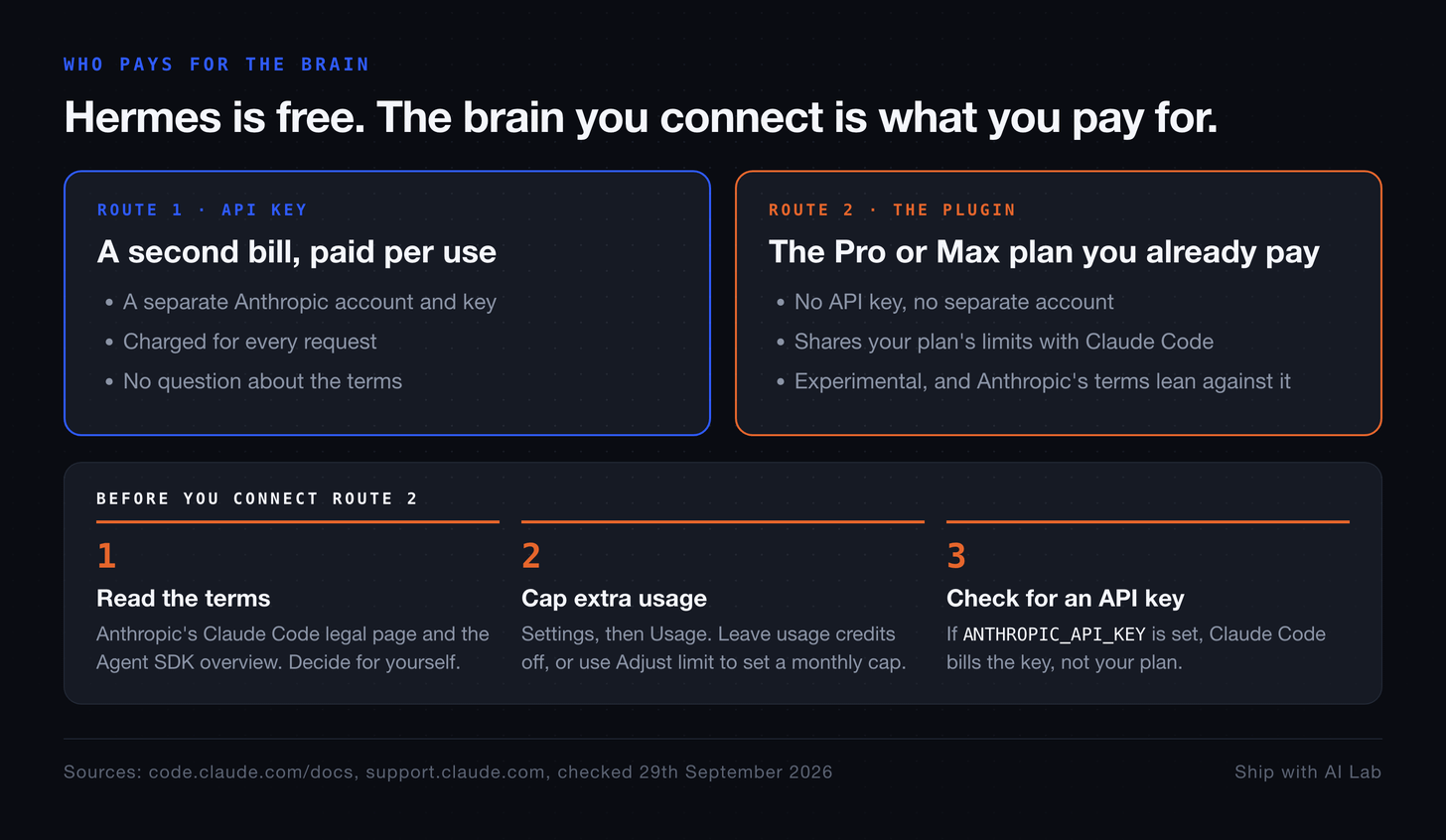
The setup, in 10 steps
Everything below runs in the Terminal app on a Mac, not inside a Claude or Hermes chat. Terminal is the app where you type commands: press Command and Space, type Terminal, press Enter. I have only run these steps on a Mac. Hermes has a Windows installer too, shown in step 3.
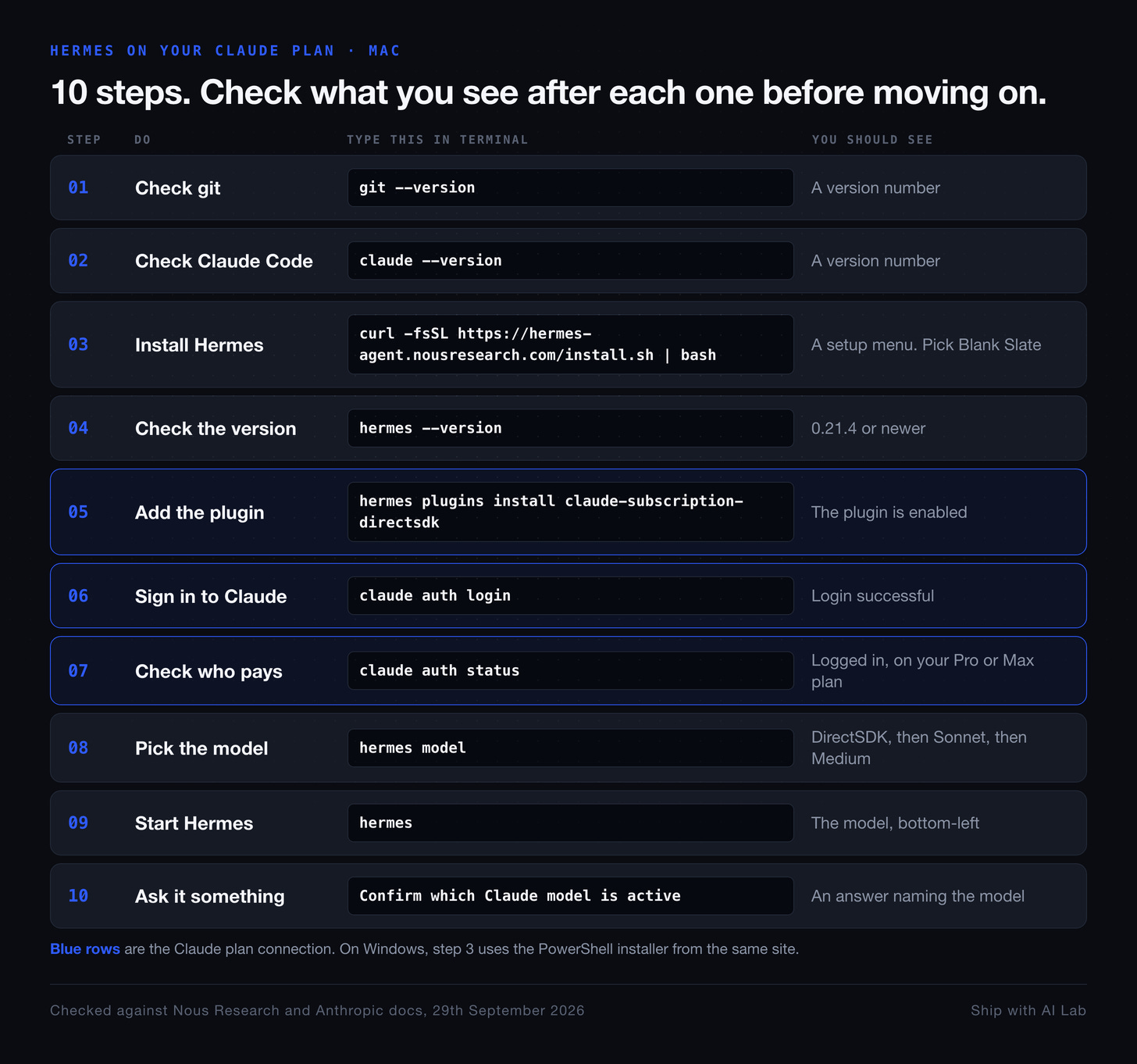
Steps 1 and 2, check what is already there. Git is a piece of software the Hermes installer uses to download its files. Type git --version and you should see a version number. In my experience, a Mac without git offers to install Apple’s developer tools the first time you type it. Say yes. Then claude --version. If it says command not found, the install guide covers that first.
Step 3, install Hermes. Paste this whole line and press Enter:
curl -fsSL https://hermes-agent.nousresearch.com/install.sh | bash
curl downloads an install script from Nous Research’s own site, and bash runs it on your machine. That is a normal way to install developer tools, and it also means you are trusting whoever wrote the script, so only run it from that exact address. On Windows, open PowerShell instead and paste iex (irm https://hermes-agent.nousresearch.com/install.ps1), or download the Hermes desktop app from the same site.
The first install can take several minutes, because it downloads Hermes, prepares Python and builds its web interface. Let it finish. When it asks how you want to set up Hermes, choose Blank Slate with the arrow keys and press Enter. Blank Slate starts with the minimum, a brain, file tools and the terminal, and you add the rest later. If it then asks you to pick a provider, which means which brain to use, choose Leave unchanged. The plugin sets that in step 5.
Step 4, check the version. Run hermes --version. You should see 0.21.4 or newer, which the plugin needs. If yours is older, run hermes update and check again.
Step 5, add the plugin.
hermes plugins install claude-subscription-directsdk
It asks twice whether to go ahead. Type y and press Enter both times, then wait for the line that says the plugin is enabled. If something does not match, the plugin's own page lists what it needs.
Steps 6 and 7, sign in and check which account pays.
claude auth login
A browser opens. Sign in with the account that holds your Pro or Max plan, and wait for “Login successful” in Terminal. Then run claude auth status. It should show that you are logged in and which plan you are on. This decides whose plan every Hermes run uses, so check it is the account you meant. The output shows your email, so do not post a screenshot of it.
Step 8, pick the model. Run hermes model. A menu opens. Choose Claude Subscription DirectSDK (Experimental), which is the plugin, then Sonnet, Claude’s everyday model, then Medium for reasoning effort, which is how hard it thinks before answering. You should see a line saying the default model is set. In my experience Sonnet at medium handles most personal-assistant work and uses less of your allowance than Opus, the most capable and most expensive model. Save Opus for the hard planning question.
Steps 9 and 10, start it and prove it works. Type hermes. The Hermes screen opens, with the active model in the bottom-left corner. Then ask:
Confirm which Claude model is active and briefly describe the tools you can use.
If Hermes names the Claude model and lists its tools, the brain is connected and the bill goes where you expect. Next time, you only type hermes. The install and the sign-in happen once.
The 3 errors that stop most installs
1. The plugin does not appear. The first thing to rule out is an old Hermes. Run hermes --version. If it is below 0.21.4, run hermes update, then install the plugin again.
2. The download fails halfway, with messages like “HTTP/2 stream was not closed cleanly”, “early EOF” or “unexpected disconnect”. This is the download dropping, not Hermes. Tell git to use the older, steadier connection method, then run the installer again:
git config --global http.version HTTP/1.1
Pause other big downloads while it runs. The same fix works when the plugin install times out.
3. “Claude command is missing”, or the login will not stick. Run claude --version. If it fails, Claude Code is not installed, and the install guide fixes that. If it works, run claude auth login again and check claude auth status shows the account with your plan.
One warning you can ignore: “Browser Use CLI not found”. Hermes carries on with its own built-in browser tools.
And one Windows case from my own teaching: an install log reporting that a Windows application control policy had blocked it. If your log says the same, try the desktop installer instead, and if that fails too, paste the log into Claude and ask what is blocking it.
The first three things I ask a new Hermes
These three prompts turn Hermes from a blank assistant into one that knows you. I run them in this order.
1. Let it interview you. Instead of writing its notes about you yourself, ask:
Interview me to figure out how you should work with me. Ask one question at a time. Only write down what I actually told you, and show me what you will save before saving it.
The last sentence matters most. It lets you read the notes before they become permanent.
2. Hand over what Claude already knows about you. If you have months of Claude conversations, you do not have to start from zero. Ask Claude Code for a summary Hermes can read, and keep the private parts out:
Write a summary of who I am, what I work on and how I like to work, as a file I can give to another AI assistant. Leave out bank details, rates and anything about my clients.
Read it before you paste it into Hermes. Whatever you paste stays in its history on your machine.
3. Give it one job with a time on it. For example: “Every weekday at 9 am, send me one question from what I told you I am learning.” For that message to reach your phone, a messaging app such as Telegram has to be connected, and Hermes has to be running at 9. Connecting Telegram is its own short setup, which I have not covered here.
When you do connect it, Hermes asks you to approve who can talk to it. Approve only yourself. Blank Slate gives Hermes the terminal, so whoever can message it can ask it to run commands on your computer. The same care applies if you later connect your email: a job that reads your inbox is reading text strangers wrote, and that text can carry instructions.
Once Telegram is connected, you have an assistant that knows your name and your work, with one job it does on time.
What is the first job you would give an assistant that remembers you? One line is enough.
Decide first, then install
Claude stays the brain. You keep building in Claude Code the way you do today.
Hermes adds an assistant with one memory, reachable from your phone, working on a schedule. The plugin lets it run on the plan you already pay for, and Anthropic’s terms lean against that.
So decide in this order. Read the two Anthropic pages. If you are not comfortable, use an API key and skip steps 5 to 7. If you go ahead on your plan, set a usage cap, run the 10 steps, and start with the interview prompt.
That is it for today.
Thank you for reading all the way to the end. I know how much lands in your inbox, and still you gave this one your time. Appreciate it.
Talk soon,
Aman
If this one was useful, these are the two people read next
You installed Claude Code. Here is the first hour, in order. https://shipwithailab.substack.com/p/claude-code-is-a-new-hire-here-is
12 Essential Claude Code Commands I Use Most Often, Explained https://shipwithailab.substack.com/p/12-essential-claude-code-commands